Podcasting has exploded in recent years. as one of the most engaging ways to share stories, build trust with your audience, and position yourself as an authority in your field. While there’s a lot of content out there about how to start, many people overcomplicate it. Podcasting Basics can get you started. At its core, podcasting comes down to one thing: communicating your message clearly. This post (with the video embedded below) walks you through podcasting basics. From the gear you need to recording, editing, and sharing your episodes.
Why Start a Podcast?
Podcasts allow you to connect with your audience in a more personal and conversational way than written content alone. They build rapport, demonstrate credibility, and can even bring potential clients closer to working with you. Whether you’re educating, entertaining, or simply sharing your story, podcasting offers a direct and accessible channel.
The Gear You Need
You don’t need a studio full of equipment to get started. In fact, many successful podcasters begin with just a decent microphone and a quiet space.
- Entry-level setup: Your smartphone or laptop and some free editing software.
- Step-up setup: A USB microphone, headphones, and a treated room to reduce echo.
- Professional setup: High-quality microphones, mixers, and a dedicated studio space.
Remember: start small and scale up as you grow.
Recording Tools
There are now plenty of user-friendly tools to record podcasts:
- Vimeo: Great for screen recording and video podcasts, with flexible layouts and backgrounds.
- Riverside: A powerful online studio tool for remote interviews and multi-track recording.
- In-person setups: Simple mic-and-laptop combos are perfect for casual, in-situ recording.
Whatever tool you choose, focus on clear audio. Good sound quality makes the biggest difference.
Editing Your Podcast
Once you’ve recorded your episode, you’ll need to polish it. I recommend DaVinci Resolve by Blackmagic. It’s a professional-grade program, and while there’s a learning curve, it gives you a lot of control over audio and video.
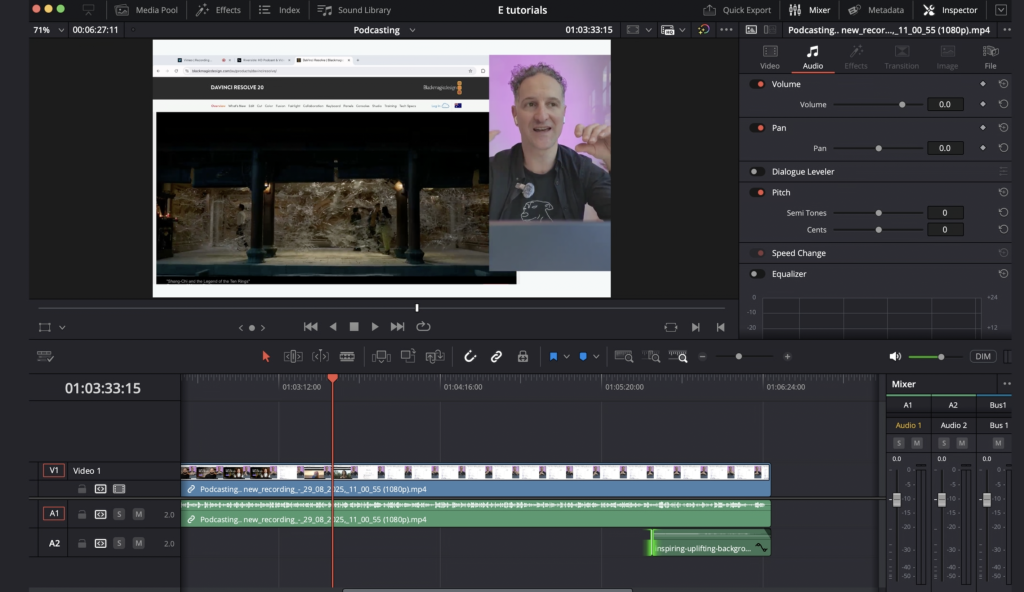
Editing steps typically include:
- Trimming unnecessary parts.
- Balancing volume levels.
- Adding intro/outro music.
- Including titles or graphics if it’s a video podcast.
Publishing Your Podcast
Where should you publish? That depends on your audience.
- Spotify & podcast apps: Great for listeners who want audio-only content, especially on the go.
- YouTube: Ideal for video podcasts and reaching new audiences, but playback stops when the screen closes.
- Your own website: Embedding podcasts on your blog is a must for SEO and conversions. Visitors can watch or listen while also learning more about your products or services.
Podcasting as a Marketing Tool
Podcasts aren’t just about content—they’re about connection. Embedding episodes on your website gives potential clients the chance to get to know you before they reach out. This reduces barriers to conversion and builds trust.
A good starting point is to record a pilot series of 1–4 episodes. This helps you test your process, become comfortable with the tools, and refine your style before launching regularly.
Next Steps
Podcasting basics don’t have to be overwhelming. With the right tools, a bit of practice, and a focus on your message, you can quickly create engaging content that works for your business.
If you’d like support getting your podcast off the ground—from pilot episodes to editing and publishing—book a free 30-minute chat with Environmentarian. We’ll help you shape your story, align it with your goals, and build content that connects with your audience.
Watch the video below for a live walkthrough of these podcasting basics: